Ocean Settings
This section covers the Ocean Settings for levels generated by a MapPreset asset.
How a MapPreset Asset Creates an Ocean
- The terrain is generated based on the World Settings, which determines the sea level.
- A
WaterBodyOceanis created at the determined sea level, submerging all terrain below that height.
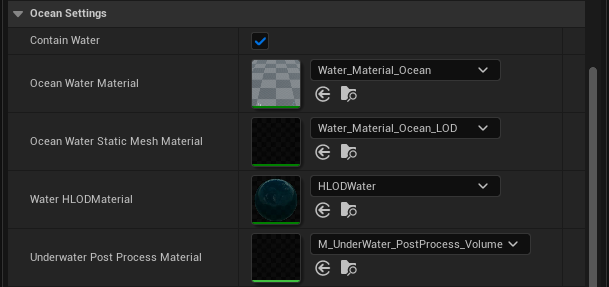
| Property Name | Description |
|---|---|
| Contain Water | Determines whether the level generated by this MapPreset asset will include an ocean. |
| Ocean Water Material | The material used to render the ocean. Applied to the WaterBodyOcean. |
| Ocean Water Static Mesh Material | The material applied to the static mesh used for rendering the ocean. Applied to the WaterBodyOcean. |
| Water HLODMaterial | The material used for the HLOD representation of the ocean. Applied to the WaterBodyOcean. |
| Underwater Post Process Material | The material used for underwater post-processing effects. Applied to the WaterBodyOcean. |
All four material properties apply to the ocean only. Rivers have their own equivalents under River Settings, so an ocean and a river in the same level can use different materials. In OCG 1.x, Water HLODMaterial and Underwater Post Process Material were shared with rivers; since 2.0.0 they are separate.
Leaving a Material Empty
Every material property here may be left empty. When it is, OCG falls back to the Water plugin’s own default for that slot, taken from Project Settings → Plugins → Water Editor → Water Body Ocean Defaults.
An empty slot in the Details panel is the normal state, not a missing setting. Fill one in only when you want this preset to override the project-wide default.