MapPreset
The MapPreset is the core data asset of the OCG plugin. By editing a MapPreset, you can define properties related to level generation, such as biome-specific vegetation, terrain appearance, and river generation.
- To create a new MapPreset, right-click in the Content Drawer and select OCG > Map Preset. Newly created presets pick up the default landscape material and PCG graph configured in Additional Settings.
Editing MapPreset
Changed in 2.0.0. Generation is now driven entirely from the OCG Window. Open it from the OCG button on the level editor toolbar, or from Window → OCG Tools → OCG. The separate MapPreset editor window and the
LevelGeneratoractor that 1.x placed in the level are gone — double-clicking aMapPresetnow opens the standard Details panel.
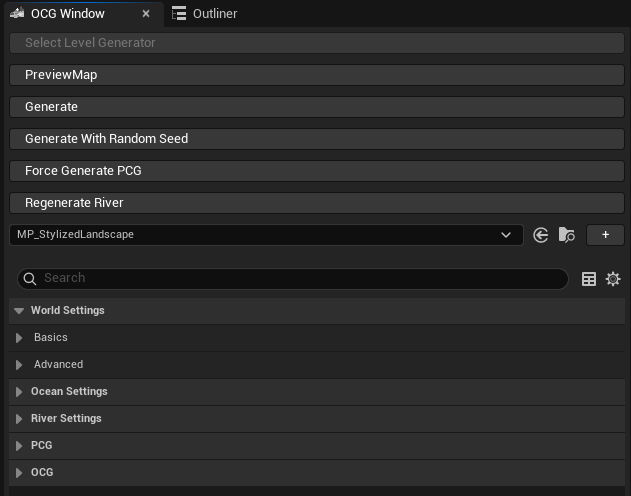
Pick the asset you want to work on in the Preset field at the top, then edit its properties in the panel below. The sidebar on the left filters the panel by category.
Toolbar
| Button | Description |
|---|---|
| Generate All | Runs the full pipeline in the current level: DataGeneration → LandscapeGen → Population → Hydrology. |
| Regen River | Re-runs only the hydrology step, reusing the cached heightmap. Requires Generate River (Experimental) to be enabled on the preset. Landscape weight edits made where the previous river ran are lost. |
| Force PCG | Forces PCG graph re-generation on every OCGLandscapeVolume in the current world. |
Inline Fields
| Field | Description |
|---|---|
| Preset | The MapPreset asset to edit and generate from. |
| Seed | The generation seed. It drives the heightmap, temperature and erosion passes, so changing it reshapes the terrain. The button beside it assigns a random value. |
| River Seed | The seed for river path generation. The button beside it assigns a random value. |
| Island | Generate the map as an island, surrounded by ocean. |
| Water | Include an ocean water body. |